


 |
|
LDAP Plus AD Help Desk Professional Tool
| |
|
LDAP Plus AD Help Desk Professional Tool provides a very simple windows like interface to generate both AD and LDAP reports which you can print or export to various formats (Excel, csv and LDIF). It also provides a very simple and easy wizard to schedule reports using windows scheduler or Linux cron. Furthermore it also provides one click searches to query active directory and ldap a necessary tool for the help desk personals or administrators to enable/disable accounts, reset user password etc.
Most Frequently Asked Questions/Reports:
How can I export/create a printable list of all users and what groups they are in from Active Directory
How can I export/create a printable list of all groups and their members from Active Directory
Out of the Box AD Reports
Out of the Box LDAP Reports |
 |
Active Directory™ Object ReportsLDAP Plus AD Help Desk Tool has a comprehensive list of Active Directory Object reports, such as:
|
Active Directory™ Logon ReportsLDAP Plus AD Help Desk Tool Logon Reports provides the following User logon reports. User logon reports can be easily customized.
|
Active Directory™ User ReportsLDAP Plus AD Help Desk Tool User Reports give detailed information on users, it provides following types of user reports.
|
Active Directory™ Password ReportsLDAP Plus AD Help Desk Tool provides the following password reports:
Active Directory™ Account ReportsLDAP Plus AD Help Desk Tool has the following built-in Account reports:
|
Active Directory™ GPO ReportsLDAP Plus AD Help Desk Tool has a comprehensive list of Active Directory GPO reports, such as:
|
Active Directory™ Logon ReportsLDAP Plus AD Help Desk Tool Logon Reports provides the following User logon reports. User logon reports can be easily customized.
|
Active Directory™ Group ReportsLDAP Plus AD Help Desk Professional Tool give ldap administrators and developers a quick view of all available groups (Security, Distribution, Universal, Mail enabled). It provides the following group reports:
|
Active Directory™ Contact ReportsLDAP Plus AD Help Desk Tool Logon Reports provides the following contact reports:
|
Active Directory™ Computer ReportsLDAP Plus AD Help Desk Tool has a comprehensive list of Active Directory Computer reports, such as:
|
Active Directory™ Printer ReportsLDAP Plus AD Help Desk Tool out of the box provides the following printer reports:
|
Active Directory™ Exchange ReportsLDAP Plus AD Help Desk Tool provides administrators and developers a quick view of the users and groups with email proxy enabled, users with webmail access etc. Out of the box it comes with the following exchange reports.
|
Active Directory™ OU ReportsOrganizational unit reports provide administrators and developers a quick insight into OUs, when they were created or modified. OU reports can be easily customized to suit the organization needs.
|
Active Directory™ Policy ReportsDomain Policy Reports can be easily exported or printed, just click the domain in the explorer view and it will display all of the domain properties such as Password age, Minimum Password length etc. |
|
LDAP Object ReportsLDAP Plus AD Help Desk Tool has a comprehensive list of LDAP Directory Object reports, such as:
|
LDAP User ReportsLDAP Plus AD Help Desk Tool User Reports give detailed information on users, it provides following types of user reports.
|
LDAP Group ReportsLDAP Plus AD Tool give ldap administrators and developers a quick view of all available groups. It provides the following group reports:
|
LDAP Plus AD Help Desk Tool is a high performance tool for Active Directory and LDAP administration and development. LDAP Plus AD Help Desk Tool has a state-of-the art graphical user interface with well defined wizards and so clear in use that even a newbie will not be confused with it.
Easy Active Directory ManagementLDAP Plus AD Help Desk Tool allows you to create and edit entries quickly. Ldap connection profiles give you the opportunity to connect to active directory server in one touch and work with the selected active directory connection only. With this tool you can connect to active directory locally, remotely and using SSL.
|
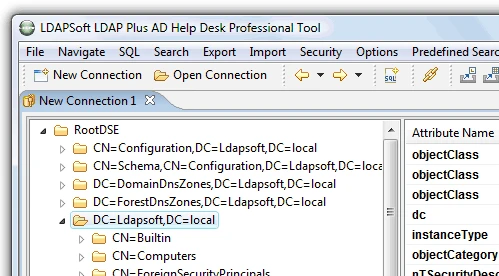 |
With LDAP Plus AD Help Desk Tool you can connect to Active Directory Locally, Remotely or Using SSL. If the machine you are connected from is connected to the domain it will prompt you to enter password and will create a connection for you. If you want to connect to Active Directory remotely or SSL you can easily create a new connection using new connection wizard.
LDAP Plus AD Tool makes it simple to manage your active directory users through it's easy to use interface. User management in LDAP Plus AD Help Desk Tool helps you to create and modify users, configure their general attributes, configure their group memberships, lock and unlock their accounts, expire their password, reset their password etc.
With this active directory tool you can easily set your Active directory domain properties, just right click the domain and change the properties you want to change. Domain properties window will let you configure the domain password policies, lockout policies, password complexity rules, password length etc.
LDAP Plus AD Tool simplifies the active directory group management. It provides tool to easily create different types of group and assign members to them.
You can assign members to group or groups to members.
LDAP Plus AD Help Desk Tool provides you with an ability to copy or move objects across containers by dragging and dropping the entries or containers, use Windows clipboard to copy a set of objects, DN, LDIF and so on. You can perform operations with a group of objects as well as with a single object.
When you select an entry all cut, copy, paste, rename and delete operations occur relative to this selected entry.
With LDAP Plus AD Tool you can view all available attributes. It not only displays attributes with values but also attributes without values. You can also add more values to the existing attributes by just right clicking and selecting 'Add another value'
LDAP Plus AD Help Desk Tool let you customize the behavior of it's tools and set a lot of other preferences. From the preferences menu you can customize the attribute column shown, adjust the attribute type colors (Required, Optional, Operational, new attributes), logging, startup options, value editors for attributes and confirmations.
LDAP Plus AD Tool provides a visual LDAP Filter builder where you can easily build ldap filters using Active Directory/LDAP attributes.
It also provides a very powerful, flexible, user-friendly tool for querying Active Directory/LDAP using sql like syntax.
Key Search and Export Features: |
|
LDAP Plus AD Help Desk Professional Tool provides a powerful search tool which allows you either to create the search filter text directly or to build the filter visually by selecting the attributes.
LDAP Plus AD Help Desk Tool allows you to search Active Directory using SQL like syntax. It provides two powerful tools which allow you either to edit query text directly with syntax highlighting or to build a query visually with a drag and drop of keywords and attributes.
LDAP Plus AD Help Desk Tool provides a simple and easy to use sql command line tool where you can enter a simple update statement to update thousands of records.
Following Types of Updates Statements are Supported
1. UDPATE (To Update a single value attribute)
2. UPDATE ADD (To Add another attribute value)
3. UPDATE REPLACE (To replace an existing value of a multivalue attribute)
Using this active directory tool, you can mass modify user attributes using sql like syntax for example to assign a manager to all users in chicago container you write a sql statement as:
Update CN=Chicago,DC=ldapsoft,DC=local Set manager='CN=jdoe,CN=Users, DC=ldapsoft, DC=local' where objectclass='user' subtreescope
Please use UpdateReplace to update attributes with multiple values.
With LDAP Plus AD Help Desk Professional Tool , you can easily schedule excel, csv or ldif export using windows scheduler/Linux cron or run it from command line. You can also schedule sqlldap excel, csv or ldif exports.
LDAP Plus AD Tool wizards let you easily schedule excel, csv or ldif export using windows scheduler. You can schedule export to the file system and/or send them through email.
The tool also allows you to run the export from command line.
LDAP Plus AD Help Desk Tool wizards and editors allow you to create, edit and delete attributes. It provides a set of powerful editors to edit the binary, Hex, File, image, object class, DN, Generalized Time, Boolean and Integer fields.
With Generalized Time/AD Time Editor you can view and edit the current time attributes it automatically converts the ad attribute to local time zone and display the date in human readable format.
LDAP Plus AD Help Desk Tool password editor allows you to enter password in plain text as well as various hash methods. Following hash methods are supported:
1. SHA
2. SSHA
3. MD5
4. SMD5
5. CRYPT
With LDAP Plus AD Tool Image editor you can add/update jpeg photo images. Image editor automatically converts different photo formats to jpg and add/update the existing images.
|
|
|||||||||||||||||||||||||||||||||||||||||||||
Microsoft®, Windows®, Windows NT®, Active Directory® are trademarks or registered trademarks of Microsoft Corporation in the United States, other countries, or both. Tivoli® and IBM® are trademarks or registered trademarks of International Business Machines in the United States, other countries, or both.iPlanet is a registered trademark of Sun Microsystems. Linux® is a registered trademark of Linus Torvalds in the United States, other countries, or both. Red Hat® Enterprise Linux® and Red Hat® Linux® are trademarks of Red Hat, Inc. in the United States, other countries, or both. SUSE® is a trademark of SUSE AG, a Novell business, in the United States, other countries, or both. eDirectory is a trademark of Novell, Inc. in the United States, other countries, or both. Siemens® is a registered trademark of Siemens AG.Oracle® is a registered trademark of Oracle Corporation and/or its affiliates. OpenLDAP® is a registered trademark of OpenLdap Foundation. Ubuntu is a registered trademarks of Canonical Ltd. . Other third-party trademarks are the property of their respective owners.LDAPSoft is a software company which builds LDAP Tools to connects to LDAP based directories. All of our LDAP and AD Tools are LDAP Clients.
 Windows 7, Windows 2008, Windows Vista
 Red Hat, Suse, Ubuntu, Fedora & Other Linux with GTK
 View Demo


